Yesterday I participated in the work of the 2011 Emergency Responders Workshop (pdf) organized by WisDOT, CVTA and GLTEI. The workshop had two major goals. One was to provide a sampling of state-of-the-art technologies used by emergency responders. The other was to begin charting a path toward developing advanced technologies. Participants from emergency responder agencies, industry and academia discussed their vision for future technologies as well as barriers to progress.
My presentation focused on pervasive (or ubiquitous) computing for law enforcement. I encouraged participants to ask the following question:
“What should be the focus of R&D efforts targeting percom technologies for emergency responders?”
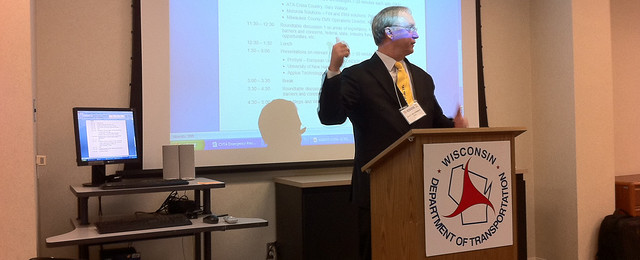
CVTA President Scott McCormick (in picture below) and WisDOT’s John Corbin led the meeting superbly – thanks to both for including me in this effort.
I am seeking UNH CS students (individuals or teams) interested in developing a user interface on a multi-touch table. The interface would allow a human operator to control a fleet of unmanned aerial vehicles (UAVs). This project will part of a collaborative effort with WPI on creating a fleet of UAVs. Students at WPI will focus on building the UAVs. Students at UNH will work on communication issues (with Professor Nicholas Kirsch) and on user interface issues (with me).
What should the user interface do?
The operator should be able to view and manipulate data sent out by the UAV fleet. Data types of interest include images, video, sounds and outputs from various sensors (temperature, pressure, accelerometers, etc.). Data manipulation will require some simple processing, such as setting beginning and end points for sounds, zooming images, etc. It will also require more complex processing of data, e.g. filtering.
What are the data sources?
Eventually, the data will come from UAVs. However, as a first step, data will be generated through games, similarly to work done by Jatin Matani and Trupti Telang. Thus, we might utilize cell phones to get images, webcams to get video, and Arduino boards to generate sensor data (e.g. temperature).
What platform will be used?
The project will leverage Project54′s Microsoft Surface multi-touch table. Here is a video by UNH ECE graduate student Tim April introducing some of the interactions he has explored with the Surface.
Is this a job, a project, or something else?
CS students would be able to use this effort as a senior project (details to be worked out with appropriate CS faculty). An independent study might also be a possiblity. Finally, I am interested in hiring students for academic year and/or summer jobs.
Can CS and ECE students collaborate?
Collaboration is not a requirement. However, some aspects of this work might benefit from the involvement of one or more UNH ECE students. E.g. ECE students can work on some of the data processing aspects of the projects, as well as on creating data sources (e.g. deployment of wireless sensor networks). I am actively recruiting ECE students for multi-touch projects and you are welcome to talk to your friends in ECE.
What are the required skills? And what new skills will I acquire?
For CS students, work on this project will require object-oriented programming that is necessary to control the multi-touch table. You will explore the application of these skills to the design of surface user interfaces as well as experiments with human subjects – after all we will have to systematically test your creation!
Interested? Have questions, ideas, suggestions?
Email me.
I am seeking students (individuals or teams) for two senior projects. Both projects would leverage a multi-touch surface to create a natural user interface for pervasive computing applications.
Pervasive computing problems and ideas are often introduced using videos. An excellent exampe is the Microsoft Health Future Vision video (download, watch on YouTube).
Let’s focus on three themes from the video that are relevant to the senior projects: interactions with multi-touch interfaces, interactions with tangible user interfaces, and data manipulation/fusion. Multi-touch surfaces appear throughout the video: in Sabine’s home, in the doctor’s office, and in the hospital lobby. Several of the multi-touch interfaces, such as Sabine’s remote control, and her virtual wallet (used in the lobby), are tangible interfaces. Finally, Dr. Kemp manipulates/fuses data when interacting with Alex (patient in bed) and especially during the meeting with Sabine and Wei Yu.
The two senior projects will leverage Project54′s Microsoft Surface multi-touch table. Here is a video by UNH ECE graduate student Tim April introducing some of the interactions he has explored with the Surface.
With all this in mind, here are the specifics on the two proposed projects.
Project 1: Mobile data fusion
This project will explore fusing data, such as images, video, sounds and outputs from various sensors (temperature, pressure, accelerometers, etc.). Data fusion will require some simple processing, such as setting beginning and end points for sounds, zooming images, etc. It will also require more complex digital signal processing of data, e.g. windowing and filtering (topics covered in ECE 714). Consequently, work on this project will focus on data processing as well as object-oriented programming that is necessary to control the multi-touch table.
This project will be tied to a collaborative effort with WPI on creating a fleet of UAVs. Thus, eventually, the data to process and display on the multi-touch will come from the UAVs. However, as a first step, data will be generated through games, similarly to work done by Jatin Matani and Trupti Telang.
Project 2: IR wallet
The Microsoft Surface uses infrared illumination and cameras to recognize interactions with its surface. It can also recognize 2D barcodes if they are visible in the IR part of the spectrum. The “IR wallet” project would result in a tangible user interface, similar to Sabine’s virtual wallet, that can display 2D barcodes in IR. These in turn will be picked up by the Microsoft Surface. Work on this project will focus on microcontroller-based design (e.g. with an Arduino board) and object-oriented programming for the Surface.
Interested? Have questions, ideas, suggestions? Email me.
Nick joined UNH ECE in the fall of 2010. His interest is in spectrally efficient wireless communications systems utilizing software defined radios. Tom and I have been involved with the Project54 system since 1999. Tom’s interest is in embedded system design and application development and on human-computer interaction with mobile devices. My primary interest is in human-computer interaction for mobile devices and for desktop multi-touch devices.
During the spring 2010 semester I taught a new course entitled Ubiquitous Computing Fundamentals. The term ubiquitous computing refers to the model of computing in which computers are embedded in everyday objects and become part of everyday activities. As the name implies, this course was designed as an introduction to this exciting field of study.
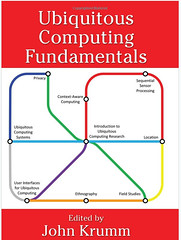
In this course I used the excellent new ubicomp textbook [1] edited by John Krumm. I highly recommend this book to anyone starting out in the field of ubicomp. Specifically, I like two aspects of the book. First, the team of contributors assembled by John provides a comprehensive introduction to the myriad topics that make up the ubicomp field. The fact that ubicomp is an interdisciplinary field is exciting, but getting an overview of the field may seem like a daunting task. The textbook provides this overview. Second, paraphrasing Aaron Quigley‘s assessment of his chapter [2], the book provides “an entry point” to the world of conducting research in general, and ubicomp research in particular. The contributors discuss the tools used in various aspects of ubicomp research, from prototyping, to user studies, to data processing. The individual chapters help the reader formulate research questions and steps, and provide valuable tips on how to report on results.
The course covered three topic areas:
History of ubicomp. The semester started with Weiser’s seminal paper [3] and with a textbook chapter introducing ubicomp by Roy Want, one of Weiser’s collaborators at Xerox PARC.
Building ubicomp systems. We discussed various aspects of creating ubicomp systems, from writing always-on software, to privacy, to conducting laboratory and field experiments.
The user experience. As this is my research focus, we spent a considerable amount of time discussion user interactions with ubicomp systems, from speech interactions, to multi-touch tables, to tangible user interfaces.
I found that an excellent way to discuss ubicomp topics is to take advantage of research videos posted online. We viewed many such videos and this led to productive discussions. We also benefited from excellent talks by Marko Popovic, Bret Harsham and Albrecht Schmidt.
I felt that the course was a success. Students indicated that they liked the course and thought that it was useful. The course also allowed students to express themselves creatively through the course project. The results were impressive and I’ll end this post with an example. The video below is the work of UNH ECE seniors Amy Schwarzenberg and Kyle Maroney (both graduated in May). Amy and Kyle explored user interactions with a Microsoft Surface multi-touch table.
Last month (April 16) Albrecht Schmidt visited UNH and the Project54 lab. Albrecht gave an excellent talk introducing some of the research problems in pervasive computing and specifically touching on the latest results from his lab, which were just published at CHI 2010 [1, 2]. I was especially interested in the work on helping users find the last place of interest on a map quickly. Albrecht and colleagues track the user’s gaze and when the user looks away, they place a marker (or gazemark) on the map. When the user looks back at the map she can start where she left off: at the place of the marker. Clearly this could be very useful when looking at GPS maps in a car. In such a situation the driver has to keep going back and forth between the map and the road and you want to minimize the time spent looking at the map (the road being the more important thing to look at!). The gazemarks introduced by Albrecht’s group may help. It would be interesting to conduct a driving simulator study with gazemarks.
After the talk Albrecht spent about an hour with students from the Project54 lab and those in my Ubicomp Fundamentals course. This was a more intimate setting for conversations about Albrecht’s research. Finally, Project54 staff and students spent a couple of hours discussing Project54 research with Albrecht – our work on handheld computers, on driving simulator-based investigations of in-car user interfaces and our budding efforts in multi-touch table interaction.
I am grateful to the UNH Provost’s Office for helping to fund Albrecht’s visit through a grant from the Class of 1954 Academic Enrichment Fund.